 iVIGA Kais Factory Supplier

Sensor faucets are commonly known as automatic faucet or touchless faucet or motion sensing faucet. These faucets come equipped with a sensor and mechanism that allows water to flow in response to the hand’s presence in closeness to the faucet.
Having a Sensor kais dej in your bathroom has become an essential need nowadays as it requires no touching therefore, transmitting of germs and bacteria can be avoided. Installing a sensor faucet in your bathroom is a very easy process, you just need a sufficient water-supply pressure.
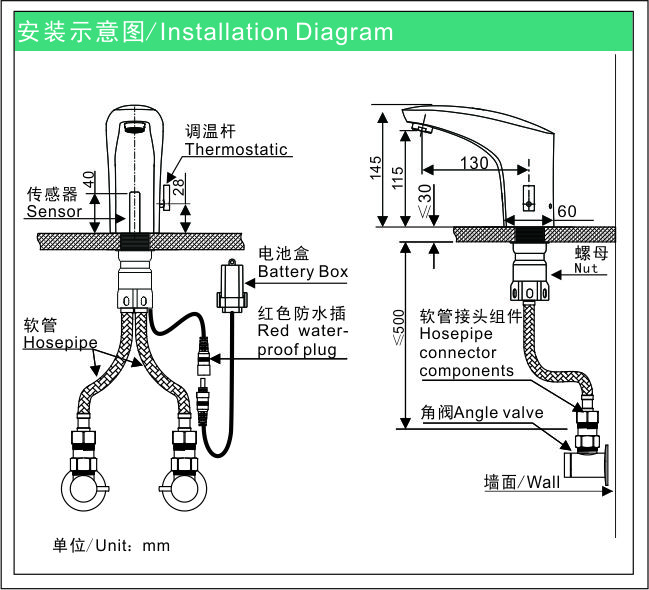
Steps for Installing a Sensor Faucet
- Carefully remove the Sensor faucet from its packaging box.
- Take the sensor tap and connect the faucet’s flexible hose and tighten firmly.
- Adjust the flexible hose and sensor signal cable through the washbasin’s hole.
- Securely fix the sensor tap to your required position on the washbasin.
- Strongly attach all the fittings provided, tighten the sensor tap to the basin.
- Open the battery section and insert 4x AA alkaline batteries.
- Connect flexible pipe from the tap the ‘outlet’ point of the control unit.
- Connect the sensor cable from your faucet to the control unit.
- Your sensor faucet is now connected and will work.
The best part about the sensor faucet is that it works on either of a power mode. When both power modes connected, it will work on AC & if there is a power failure it will switch to DC automatically.
If you would like to know more about installation of a sensor faucet in your bathroom, you can connect with us or you can share your contact and location details with us.
One of our team member from the concerned department will contact you.
Email:info@viga.cc ib
Xov tooj:86-0750-2738266
Lub vev xaib: www.viga.ccc